finlab.plot
Data visualization module providing a variety of visualization tools designed for Taiwan stock market data.
Use Cases
- Draw stock candlestick charts with technical indicators
- Visualize market heatmaps (treemaps)
- Compare financial metrics across multiple stocks (radar charts)
- Observe stock price and valuation relationships (river charts)
- Analyze strategy holdings distribution (sunburst charts)
- Display strategy performance statistics
Quick Examples
Candlestick Chart with Technical Indicators
from finlab.plot import plot_tw_stock_candles

# Draw TSMC candlestick chart
plot_tw_stock_candles(
    stock_id='2330',
    recent_days=200
).show()
Market Heatmap (Treemap)
from finlab.plot import plot_tw_stock_treemap

# Visualize market heatmap for 2024-01-01
plot_tw_stock_treemap(
    start='2024-01-01',
    end='2024-01-01',
    area_ind='market_value',  # Block size: market cap
    item='return_ratio'        # Color: return rate
).show()
Financial Metrics Radar Chart
from finlab.plot import plot_tw_stock_radar

# Compare financial metrics across multiple stocks
plot_tw_stock_radar(
    portfolio=['2330', '2454', '2317'],
    feats=[
        'fundamental_features:營業毛利率',
        'fundamental_features:營業利益率',
        'fundamental_features:稅後淨利率'
    ],
    mode='bar_polar'
).show()
Detailed Guide
See Data Visualization Tutorial for: - Complete examples for all visualization tools - Custom chart styles and color schemes - Interactive chart usage tips - Exporting charts as images
API Reference
plot_tw_stock_candles()
finlab.plot.plot_tw_stock_candles
plot_tw_stock_candles(symbol, recent_days=400, adjust_price=False, resample='D', overlay_func=None, technical_func=None)
繪製台股技術線圖圖組
Args:
symbol (str): 台股股號,ex:'2330'。
recent_days (int):取近n個交易日資料。
adjust_price (bool):是否使用還原股價計算。
resample (str): 技術指標價格週期,ex: D 代表日線, W 代表週線, M 代表月線。
overlay_func (dict):
K線圖輔助線,預設使用布林通道。
from finlab.data import indicator

overlay_func={
             'ema_5':indicator('EMA',timeperiod=5),
             'ema_10':indicator('EMA',timeperiod=10),
             'ema_20':indicator('EMA',timeperiod=20),
             'ema_60':indicator('EMA',timeperiod=60),
            }
    設定多組技術指標:
    ```py
    from finlab.data import indicator

    k,d = indicator('STOCH')
    rsi = indicator('RSI')
    technical_func = [{'K':k,'D':d},{'RSI':rsi}]
    ```
| RETURNS | DESCRIPTION |
|---|---|
Figure
|
技術線圖 |
Examples:
from finlab.plot import plot_tw_stock_candles
from finlab.data import indicator

overlay_func={
              'ema_5':indicator('EMA',timeperiod=5),
              'ema_10':indicator('EMA',timeperiod=10),
              'ema_20':indicator('EMA',timeperiod=20),
              'ema_60':indicator('EMA',timeperiod=60),
             }
k,d = indicator('STOCH')
rsi = indicator('RSI')
technical_func = [{'K':k,'D':d},{'RSI':rsi}]
plot_tw_stock_candles(symbol='2330',recent_days=600,adjust_price=False,overlay_func=overlay_func,technical_func=technical_func)
Usage Examples:
from finlab.plot import plot_tw_stock_candles
from finlab.data import indicator

# Basic usage: Draw candlestick chart
plot_tw_stock_candles('2330', recent_days=200).show()

# Add technical indicators
fig = plot_tw_stock_candles('2330', recent_days=200)
# Use fig.add_trace() to add custom indicators
fig.show()
Parameter Details
- stock_id: Stock ticker (string)
- recent_days: Display the most recent N days of data
- Returns a plotly.graph_objects.Figure object for further customization
Notes
- Requires
plotlypackage:pip install plotly - Candlestick chart displays close, open, high, and low prices by default
- Call
.show()to display in Jupyter Notebook
plot_tw_stock_treemap()
finlab.plot.plot_tw_stock_treemap
plot_tw_stock_treemap(start=None, end=None, area_ind='market_value', item='return_ratio', clip=None, color_continuous_scale='Temps', treemap_data=None)
繪製台股板塊圖資料
巢狀樹狀圖可以顯示多維度資料,將依照產業分類的台股資料絢麗顯示。
| PARAMETER | DESCRIPTION |
|---|---|
start
|
資料開始日,ex:
TYPE:
|
end
|
資料結束日,ex:
TYPE:
|
area_ind
|
決定板塊面積數值的指標。
可選擇
TYPE:
|
item
|
決定板塊顏色深淺的指標。
除了可選擇依照 start 與 end 計算的
TYPE:
|
clip
|
將 item 邊界外的值分配給邊界值,防止資料上限值過大或過小,造成顏色深淺變化不明顯。 ex:(0,100),將數值低高界線,設為 0~100,超過的數值。 Note 參考pandas文件更了解
TYPE:
|
color_continuous_scale
|
TYPE:
|
treemap_data
|
客製化資料,格式參照
TYPE:
|
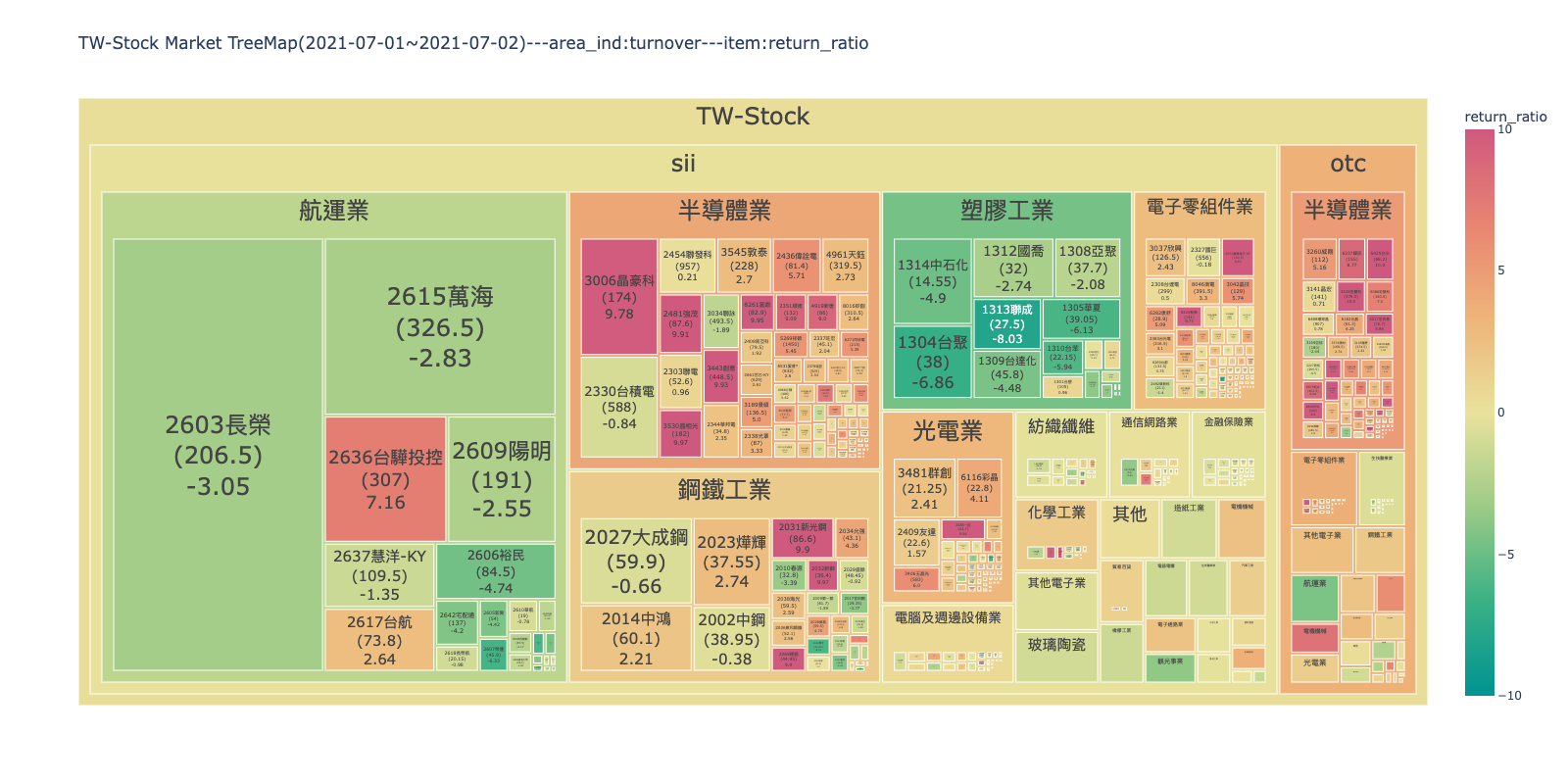
Returns: (plotly.graph_objects.Figure): 樹狀板塊圖 Examples: ex1: 板塊面積顯示成交金額,顏色顯示'2021-07-01'~'2021-07-02'的報酬率變化,可以觀察市場資金集中的產業與漲跌強弱。
from finlab.plot import plot_tw_stock_treemap
plot_tw_stock_treemap(start= '2021-07-01',end = '2021-07-02',area_ind="turnover",item="return_ratio")
 ex2:
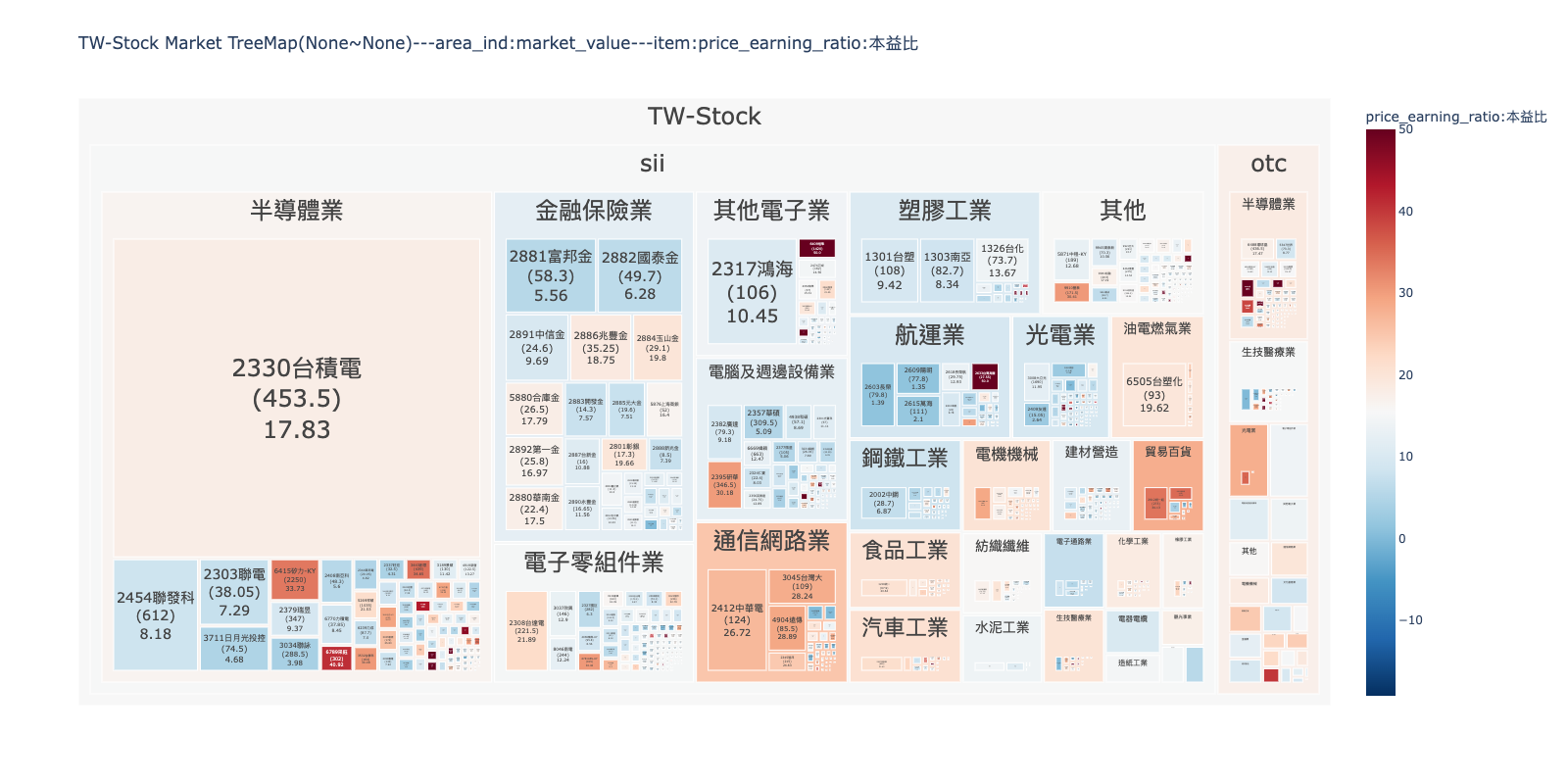
板塊面積顯示市值(股本*收盤價),顏色顯示近期本益比,可以觀察全市場哪些是權值股?哪些產業本益比評價高?限制數值範圍在(0,50),
將過高本益比的數值壓在50,不讓顏色變化突兀,能分出高低階層即可。
ex2:
板塊面積顯示市值(股本*收盤價),顏色顯示近期本益比,可以觀察全市場哪些是權值股?哪些產業本益比評價高?限制數值範圍在(0,50),
將過高本益比的數值壓在50,不讓顏色變化突兀,能分出高低階層即可。
from finlab.plot import plot_tw_stock_treemap
plot_tw_stock_treemap(area_ind="market_value",item="price_earning_ratio:本益比",clip=(0,50), color_continuous_scale='RdBu_r')
Market Heatmap Visualization:
from finlab.plot import plot_tw_stock_treemap

# Example 1: Visualize single-day market returns
plot_tw_stock_treemap(
    start='2024-01-01',
    end='2024-01-01',
    area_ind='market_value',  # Block size: market cap
    item='return_ratio'        # Color: return rate
).show()

# Example 2: Visualize trading volume
plot_tw_stock_treemap(
    start='2024-01-01',
    end='2024-01-01',
    area_ind='turnover',       # Block size: trading volume
    item='turnover_ratio'      # Color: volume ratio
).show()

# Example 3: Visualize P/E ratio distribution
plot_tw_stock_treemap(
    start='2024-01-01',
    end='2024-01-01',
    area_ind='market_value',
    item='price_earning_ratio:本益比',
    clip=(0, 50),  # Limit P/E range to 0-50
    color_continuous_scale='RdBu_r'  # Red-blue color scheme
).show()
Common Parameter Combinations
- Market heatmap:
area_ind='market_value',item='return_ratio' - Trading activity:
area_ind='turnover',item='turnover_ratio' - Valuation distribution:
area_ind='market_value',item='price_earning_ratio:本益比'
Data Range Limits
startandendare usually set to the same day (single-day snapshot)- If set to different dates, the average for the period is displayed
plot_tw_stock_radar()
finlab.plot.plot_tw_stock_radar
plot_tw_stock_radar(portfolio, feats=None, mode='line_polar', line_polar_fill=None, period=None, cut_bins=10, title=None, custom_data=None)
繪製台股雷達圖
比較持股組合的指標分級特性。若數值為nan,則不顯示分級。
| PARAMETER | DESCRIPTION | ||||||||||||
|---|---|---|---|---|---|---|---|---|---|---|---|---|---|
portfolio
|
持股組合,ex:
TYPE:
|
||||||||||||
feats
|
選定FinLab資料庫內的指標組成資料集。預設為18項財務指標。 ex:['fundamental_features:營業毛利率','fundamental_features:營業利益率']
TYPE:
|
||||||||||||
mode
|
雷達圖模式 ,ex:'bar_polar','scatter_polar','line_polar'`。 Note 參考不同模式的差異
TYPE:
|
||||||||||||
line_polar_fill
|
將區域設置為用純色填充 。ex:
TYPE:
|
||||||||||||
period
|
選擇第幾期的特徵資料,預設為近一季。 ex: 設定數值為'2020-Q2,取得2020年第二季資料比較。
TYPE:
|
||||||||||||
cut_bins
|
特徵分級級距。
TYPE:
|
||||||||||||
title
|
圖片標題名稱。
TYPE:
|
||||||||||||
custom_data
|
客製化指標分級,欄名為特徵 格式範例:
TYPE:
|
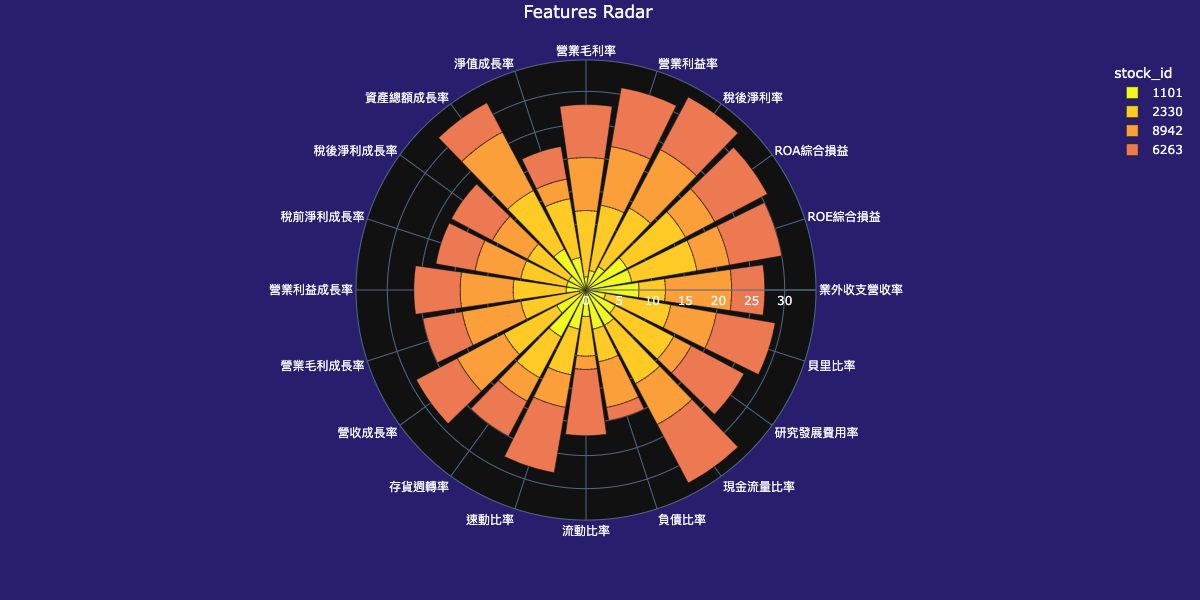
Returns: (plotly.graph_objects.Figure): 雷達圖 Examples: ex1:比較持股組合累計分數,看持股組合偏重哪像特徵。
from finlab.plot import plot_tw_stock_radar
plot_tw_stock_radar(portfolio=["1101", "2330", "8942", "6263"], mode="bar_polar", line_polar_fill='None')
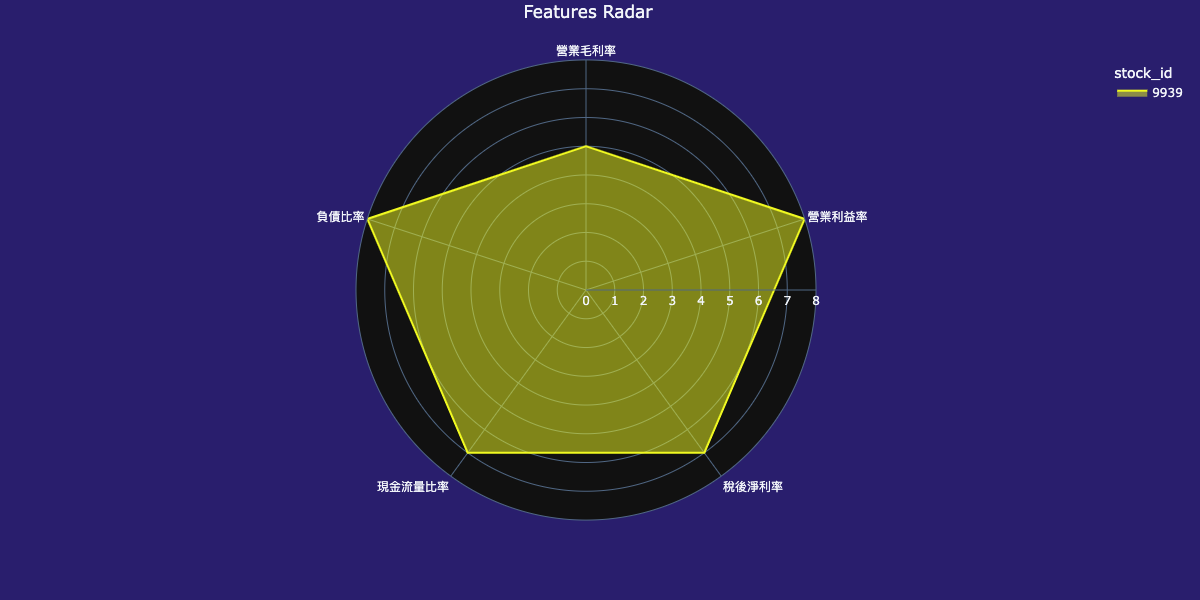
 ex2:看單一個股特徵分級落點。
from finlab.plot import plot_tw_stock_radar
feats = ['fundamental_features:營業毛利率', 'fundamental_features:營業利益率', 'fundamental_features:稅後淨利率',
         'fundamental_features:現金流量比率', 'fundamental_features:負債比率']
plot_tw_stock_radar(portfolio=["9939"], feats=feats, mode="line_polar", line_polar_fill='toself', cut_bins=8)
Multi-Stock Financial Metric Comparison:
from finlab.plot import plot_tw_stock_radar

# Example 1: Compare profitability of three semiconductor stocks
plot_tw_stock_radar(
    portfolio=['2330', '2454', '2317'],
    feats=[
        'fundamental_features:營業毛利率',
        'fundamental_features:營業利益率',
        'fundamental_features:稅後淨利率',
        'fundamental_features:股東權益報酬率'
    ],
    mode='bar_polar'  # Bar polar chart
).show()

# Example 2: Analyze multi-dimensional metrics for a single stock
plot_tw_stock_radar(
    portfolio=['9939'],
    feats=[
        'fundamental_features:營業毛利率',
        'fundamental_features:營業利益率',
        'fundamental_features:稅後淨利率',
        'fundamental_features:現金流量比率',
        'fundamental_features:負債比率'
    ],
    mode='line_polar',  # Line polar chart
    cut_bins=8          # Split metric values into 8 levels
).show()
mode Parameter Options
- 'bar_polar': Bar polar chart (recommended for comparing 2-5 stocks)
- 'line_polar': Line polar chart (suitable for single stock multi-metric display)
- 'scatter_polar': Scatter polar chart (suitable for viewing raw data points)
plot_tw_stock_river()
finlab.plot.plot_tw_stock_river
繪製台股河流圖
使用 PE or PB 的最高與最低值繪製河流圖,判斷指標所處位階。
| PARAMETER | DESCRIPTION |
|---|---|
symbol
|
台股股號,ex:
TYPE:
|
start
|
資料開始日,ex:
TYPE:
|
end
|
資料結束日,ex:
TYPE:
|
mode
|
TYPE:
|
split_range
|
河流階層數。
TYPE:
|
Returns: (plotly.graph_objects.Figure): 河流圖 Examples:
from finlab.plot import plot_tw_stock_river
plot_tw_stock_river(symbol='2330', start='2015-1-1', end='2022-7-1', mode='pe', split_range=10)
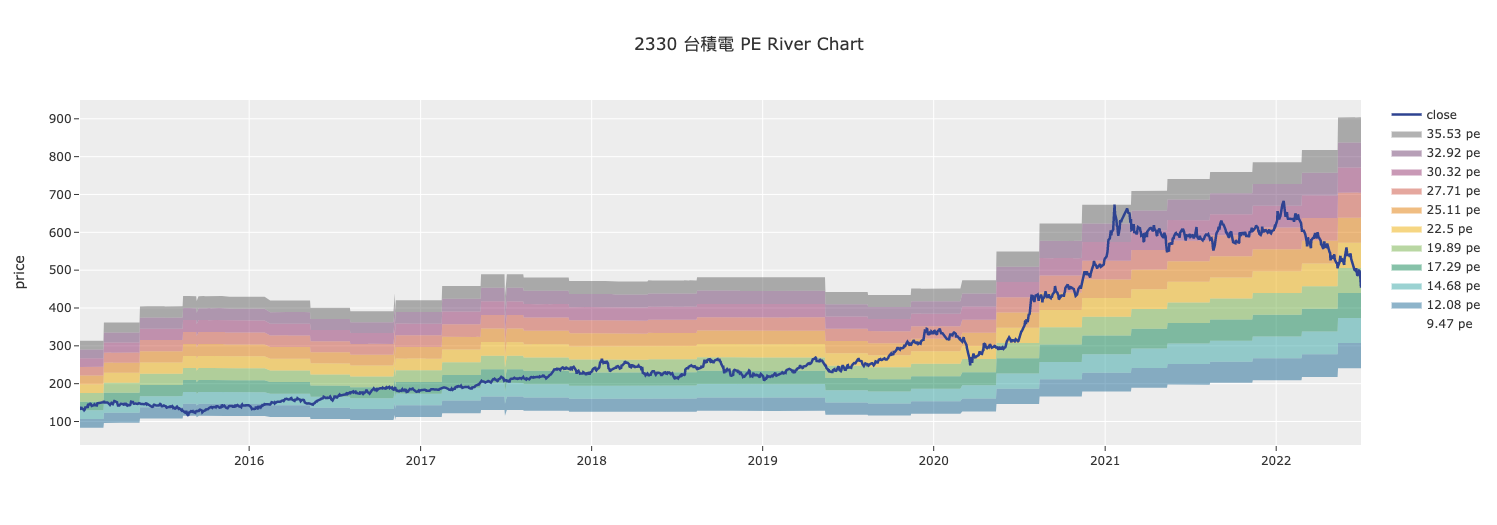
Stock Price and Valuation Relationship Visualization:
from finlab.plot import plot_tw_stock_river

# Example 1: TSMC P/E ratio river chart
plot_tw_stock_river(
    stock_id='2330',
    start='2015-01-01',
    end='2024-01-01',
    mode='pe',        # P/E ratio mode
    split_range=10    # Split P/E into 10 ranges
).show()

# Example 2: P/B ratio river chart
plot_tw_stock_river(
    stock_id='2330',
    start='2015-01-01',
    end='2024-01-01',
    mode='pb',        # Price-to-Book ratio mode
    split_range=8
).show()
mode Parameter Details
- 'pe': P/E ratio river chart (Price-to-Earnings Ratio)
- 'pb': P/B ratio river chart (Price-to-Book Ratio)
- Larger
split_rangevalues provide finer color gradations
Data Requirements
- Requires sufficiently long historical data (at least 2 years recommended)
- Financial report data has a lag; the latest quarter may not have data
create_treemap_data()
finlab.plot.create_treemap_data
產生台股板塊圖資料
產生繪製樹狀圖所用的資料,可再外加FinLab資料庫以外的指標製作客製化DataFrame,
並傳入plot_tw_stock_treemap(treemap_data=treemap_data)。
| PARAMETER | DESCRIPTION |
|---|---|
start
|
資料開始日,ex:
TYPE:
|
end
|
資料結束日,ex:
TYPE:
|
item
|
決定板塊顏色深淺的指標。
除了可選擇依照 start 與 end 計算的
TYPE:
|
clip
|
將item邊界外的值分配給邊界值,防止資料上限值過大或過小,造成顏色深淺變化不明顯。 ex:(0,100),將數值低高界線,設為0~100,超過的數值。 Note 參考pandas文件更了解
TYPE:
|
| RETURNS | DESCRIPTION |
|---|---|
DataFrame
|
台股個股指標 |
Examples:
欲下載所有上市上櫃之價量歷史資料與產業分類,只需執行此函式:

``` py
from finlab.plot import create_treemap_data
create_treemap_data(start= '2021-07-01',end = '2021-07-02')
```

| stock_id   |  close |turnover|category|market|market_value|return_ratio|country|
|:-----------|-------:|-------:|-------:|-------:|-------:|-------:|-------:|
| 1101       |   20 |  57.85 |  水泥工業 |  sii   |    111  |    0.1  |  TW-Stock|
| 1102       |  20 |  58.1  |  水泥工業 |  sii    |    111  |    -0.1 |  TW-Stock|
Generate Treemap Data (advanced usage):
from finlab.plot import create_treemap_data

# Custom treemap data
data = create_treemap_data(
    start='2024-01-01',
    end='2024-01-01',
    area_ind='market_value',
    item='return_ratio'
)

# Further process data or use other plotting tools
print(data.head())
StrategySunburst
finlab.plot.StrategySunburst
繪製策略部位旭日圖
監控多策略。
get_strategy_df
獲取策略部位與分配權重後計算的資料
| PARAMETER | DESCRIPTION |
|---|---|
select_strategy
|
選擇策略名稱並設定權重,預設是抓取權策略並平分資金比例到各策略。
ex:
TYPE:
|
Returns: (pd.DataFrame): strategies data
plot
繪圖
| PARAMETER | DESCRIPTION |
|---|---|
select_strategy
|
選擇策略名稱並設定權重,預設是抓取權策略並平分資金比例到各策略。
ex:
TYPE:
|
path
|
旭日圖由裡到外的顯示路徑,預設為
TYPE:
|
color_continuous_scale
|
TYPE:
|
| RETURNS | DESCRIPTION |
|---|---|
Figure
|
策略部位旭日圖 |
Examples:
from finlab.plot import StrategySunburst

# 實例化物件
strategies = StrategySunburst()
strategies.plot().show()
strategies.plot(select_strategy={'高殖利率烏龜':0.4,'營收強勢動能瘋狗':0.25,'低波動本益成長比':0.2,'現金':0.15},path =  ['market', 'category','stock_id','s_name']).show()
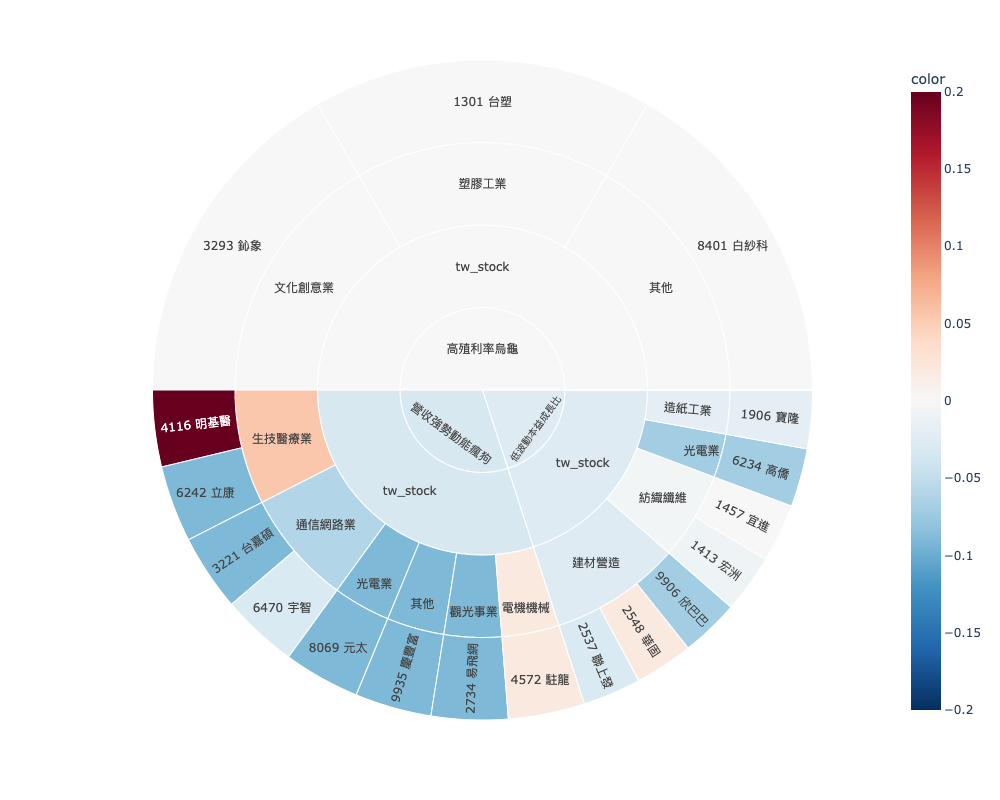
ex2:部位被哪些策略選到,標的若被不同策略選到,可能有獨特之處喔!
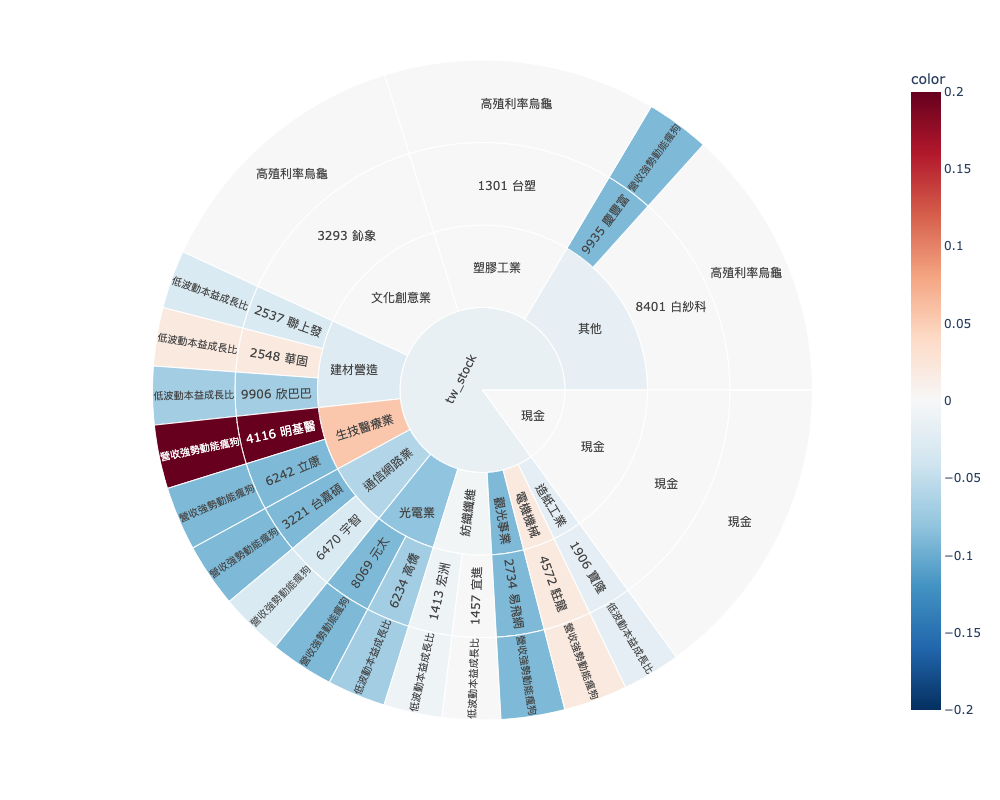
Strategy Holdings Sunburst Chart (requires cloud strategies):
from finlab.plot import StrategySunburst

# Instantiate and plot strategy holdings distribution
strategies = StrategySunburst()
strategies.plot().show()
Prerequisites
- Requires strategies uploaded to FinLab cloud
- Must be logged in to FinLab (
finlab.login()) - Displays holdings distribution across industry categories
StrategyReturnStats
finlab.plot.StrategyReturnStats
繪製策略報酬率統計比較圖
監控策略群體相對對標指數的表現。
| PARAMETER | DESCRIPTION |
|---|---|
start_date
|
報酬率計算開始日
TYPE:
|
end_date
|
報酬率計算結束日
TYPE:
|
strategy_names
|
用戶本人的策略集設定,填入欲納入統計的策略名稱,只限定自己的策略。ex:
TYPE:
|
benchmark_return
|
策略比對基準序列,預設為台股加權報酬指數。
TYPE:
|
Examples:
統計2022-12-31~2023-07-31的報酬率數據
``` py
# 回測起始時間
start_date = '2022-12-31'
end_date  = '2023-07-31'

# 選定策略範圍
strategy_names = ['膽小貓','三頻率RSI策略', '二次創高股票', '低波動本益成長比', '合約負債建築工', '多產業價投', '小蝦米跟大鯨魚', '小資族資優生策略', '本益成長比', '營收股價雙渦輪', '現金流價值成長', '研發魔人', '股價淨值比策略', '藏獒', '高殖利率烏龜','監獄兔', '財報指標20大']

report = StrategyReturnStats(start_date ,end_date, strategy_names)
# 繪製策略報酬率近期報酬率長條圖
report.plot_strategy_last_return().show()
# 繪製策略累積報酬率時間序列
report.plot_strategy_creturn().show()
```
plot_strategy_creturn
繪製策略累積報酬率時間序列
Returns:
(plotly.graph_objects.Figure): 圖表物件
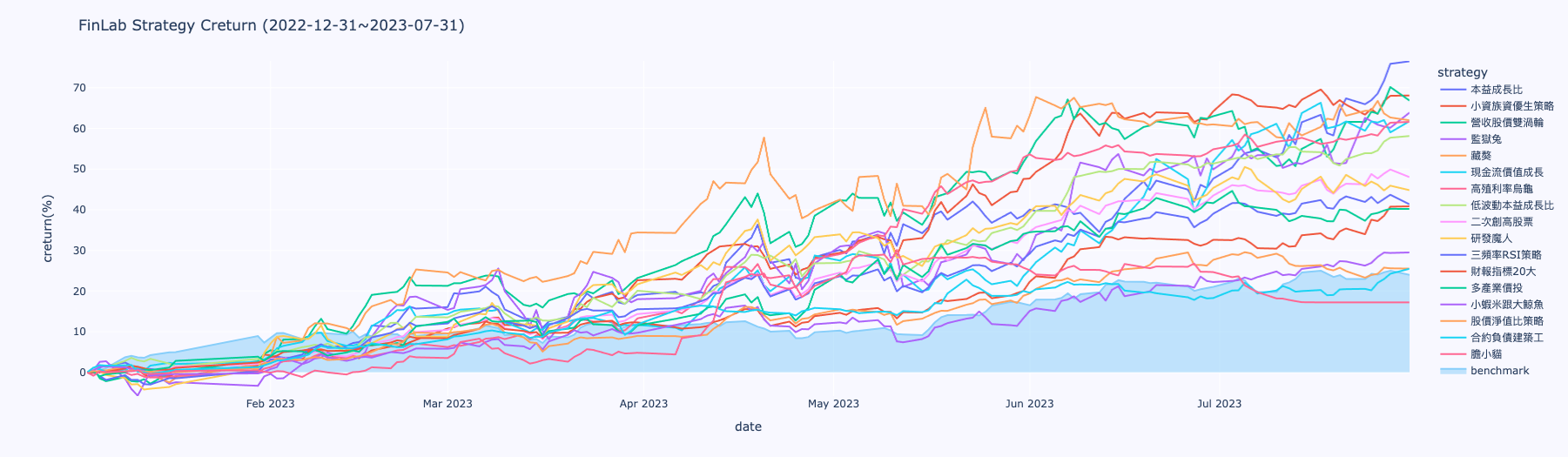
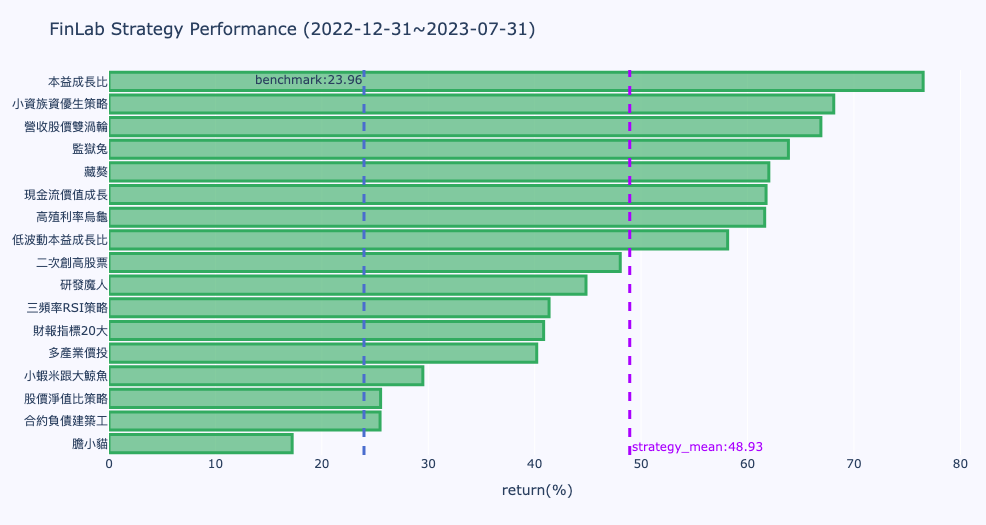
Strategy Performance Statistics Chart (requires cloud strategies):
from finlab.plot import StrategyReturnStats

# Instantiate and plot strategy performance
stats = StrategyReturnStats()
stats.plot().show()
Prerequisites
- Requires strategies uploaded to FinLab cloud
- Must be logged in to FinLab (
finlab.login()) - Displays annualized return, Sharpe ratio, and other statistics for each strategy
FAQ
Q: Charts are not displaying, what should I do?
# Cause 1: Forgot to call .show()
fig = plot_tw_stock_candles('2330')
# Not displayed

fig = plot_tw_stock_candles('2330')
fig.show()  # Correct

# Cause 2: Missing plotly package
# Solution: pip install plotly

# Cause 3: Jupyter Notebook environment issue
# Add at the beginning of the notebook:
import plotly.io as pio
pio.renderers.default = 'notebook'
Q: How do I export charts as images?
fig = plot_tw_stock_candles('2330', recent_days=200)

# Export as PNG
fig.write_image('chart.png', width=1200, height=800)

# Export as HTML (interactive)
fig.write_html('chart.html')

# Note: Exporting PNG requires kaleido
# pip install kaleido
Q: How do I customize chart styles?
fig = plot_tw_stock_candles('2330', recent_days=200)

# Change title
fig.update_layout(title='TSMC Price Trend')

# Change color theme
fig.update_layout(template='plotly_dark')  # Dark theme

# Adjust chart size
fig.update_layout(width=1200, height=600)

fig.show()
Q: What fields can be used as the item in treemaps?
# Any field accessible via data.get() can be used
# Common fields:
# - 'return_ratio' - Return rate
# - 'turnover_ratio' - Volume ratio
# - 'price_earning_ratio:本益比' - P/E ratio
# - 'price_earning_ratio:股價淨值比' - P/B ratio
# - 'fundamental_features:營業毛利率' - Gross profit margin

# Search available fields
from finlab import data
data.search('fundamental')  # Search fundamental fields
Q: Radar chart shows large value differences, what can I do?
# Use cut_bins parameter to normalize values
plot_tw_stock_radar(
    portfolio=['2330', '2454'],
    feats=[
        'fundamental_features:營業毛利率',      # Range 0-100
        'fundamental_features:股東權益報酬率',  # Range 0-100
        'fundamental_features:負債比率'         # Range 0-300
    ],
    cut_bins=10  # Split all metrics into 10 levels (0-10)
).show()
Resources
- Data Visualization Tutorial - Jupyter Notebook interactive examples
- Plotly Official Documentation - Advanced customization techniques
- Backtest Report Visualization - Built-in charts in Report object