finlab.optimize
Strategy parameter optimization and combination testing module.
Use Cases
- Test all combinations of multiple conditions: When you have multiple stock selection conditions (technical, fundamental, institutional), find the best intersection
- Quickly find the best strategy combination: Automate testing of all possible combinations, identifying the best performer from dozens of strategies
- Visually compare performance: Use heatmaps, bar charts, and line charts to quickly compare combinations
Quick Examples
from finlab import data
from finlab.optimize.combinations import sim_conditions

close = data.get("price:收盤價")
rev = data.get('monthly_revenue:當月營收')
營業利益成長率 = data.get('fundamental_features:營業利益成長率')

# Define 3 conditions
c1 = (close > close.average(20)) & (close > close.average(60))
c2 = 營業利益成長率 > 0
c3 = rev.average(3) / rev.average(12) > 1.1

exits = close < close.average(20)
conditions = {'c1': c1, 'c2': c2, 'c3': c3}

# Test all combinations (7 total: c1, c2, c3, c1&c2, c1&c3, c2&c3, c1&c2&c3)
report_collection = sim_conditions(
    conditions=conditions,
    hold_until={'exit': exits, 'stop_loss': 0.1},
    resample='M',
    position_limit=0.1,
    upload=False
)

# Visual comparison
report_collection.plot_stats('heatmap')  # Heatmap
report_collection.plot_stats('bar').show()  # Bar chart
report_collection.plot_creturns().show()  # Cumulative return line chart
Detailed Guide
See Strategy Parameter Optimization Guide for:
- Why strategy optimization is needed
- How to interpret 12 performance metrics
- How to avoid overfitting
- Optimization techniques with stop-loss/take-profit
- Practical workflow recommendations
API Reference
finlab.optimize.combinations.sim_conditions
取得回測報告集合
將選股條件排出所有的組合並進行回測,方便找出最好條件的交集結果。
| PARAMETER | DESCRIPTION |
|---|---|
conditions
|
選股條件集合,key 為條件名稱,value 為條件變數,ex:
TYPE:
|
hold_until
|
設定訊號進出場語法糖參數,預設為不使用。ex:
TYPE:
|
*args
|
TYPE:
|
**kwargs
|
TYPE:
|
| RETURNS | DESCRIPTION |
|---|---|
ReportCollection
|
回測數據報告 |
Examples:
from finlab import data
from finlab.backtest import sim
from finlab.optimize.combinations import sim_conditions

close = data.get("price:收盤價")
pe = data.get('price_earning_ratio:本益比')
rev=data.get('monthly_revenue:當月營收').index_str_to_date()
rev_ma3=rev.average(3)
rev_ma12=rev.average(12)

c1 = (close > close.average(20)) & (close > close.average(60))
c2 = (close == close.rolling(20).max())
c3 = pe < 15
c4 = rev_ma3/rev_ma12 > 1.1
c5 = rev/rev.shift(1) > 0.9
exits = close < close.average(20)
conditions = {'c1':c1, 'c2':c2, 'c3':c3, 'c4':c4, 'c5':c5}
report_collection = sim_conditions(conditions=conditions, hold_until={'exit':exits, 'stop_loss':0.1}, resample='M', position_limit=0.1, upload=False)
# 策略分組指標報告
# print(report_collection.stats)
report_collection.plot_creturns().show()
report_collection.plot_stats('bar').show()
report_collection.plot_stats('heatmap')
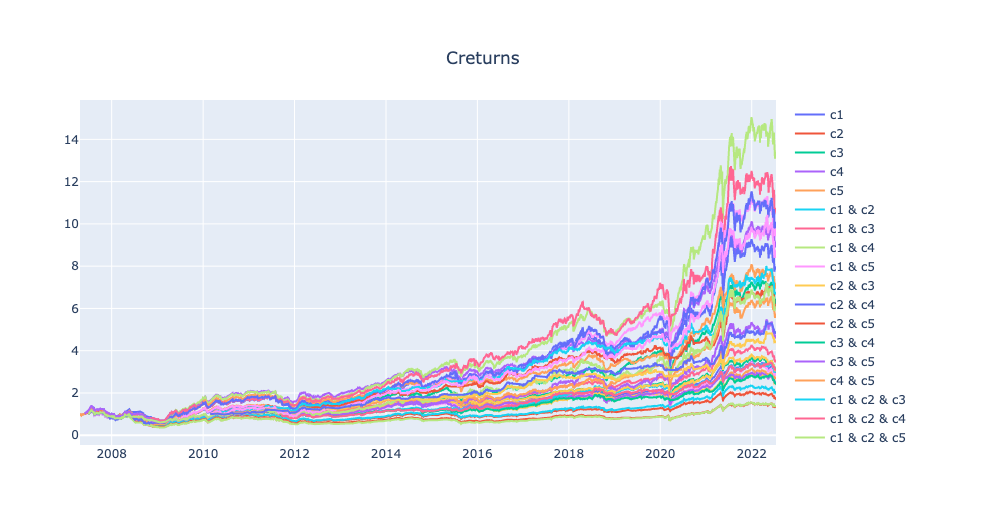
ex1:
report_collection.plot_creturns().show()
繪製折線圖指標分群棒狀圖
ex2:
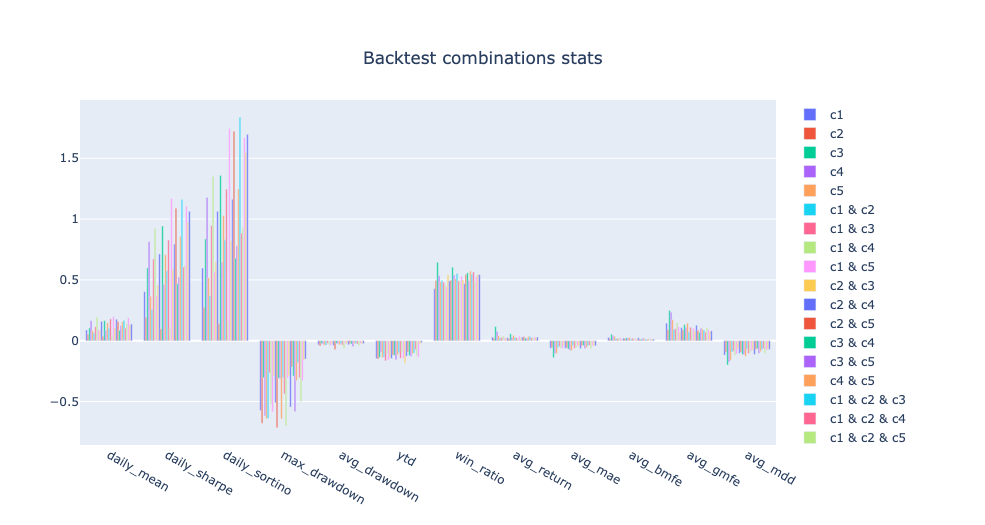
report_collection.plot_stats('bar').show()
繪製指標分群棒狀圖
ex3:
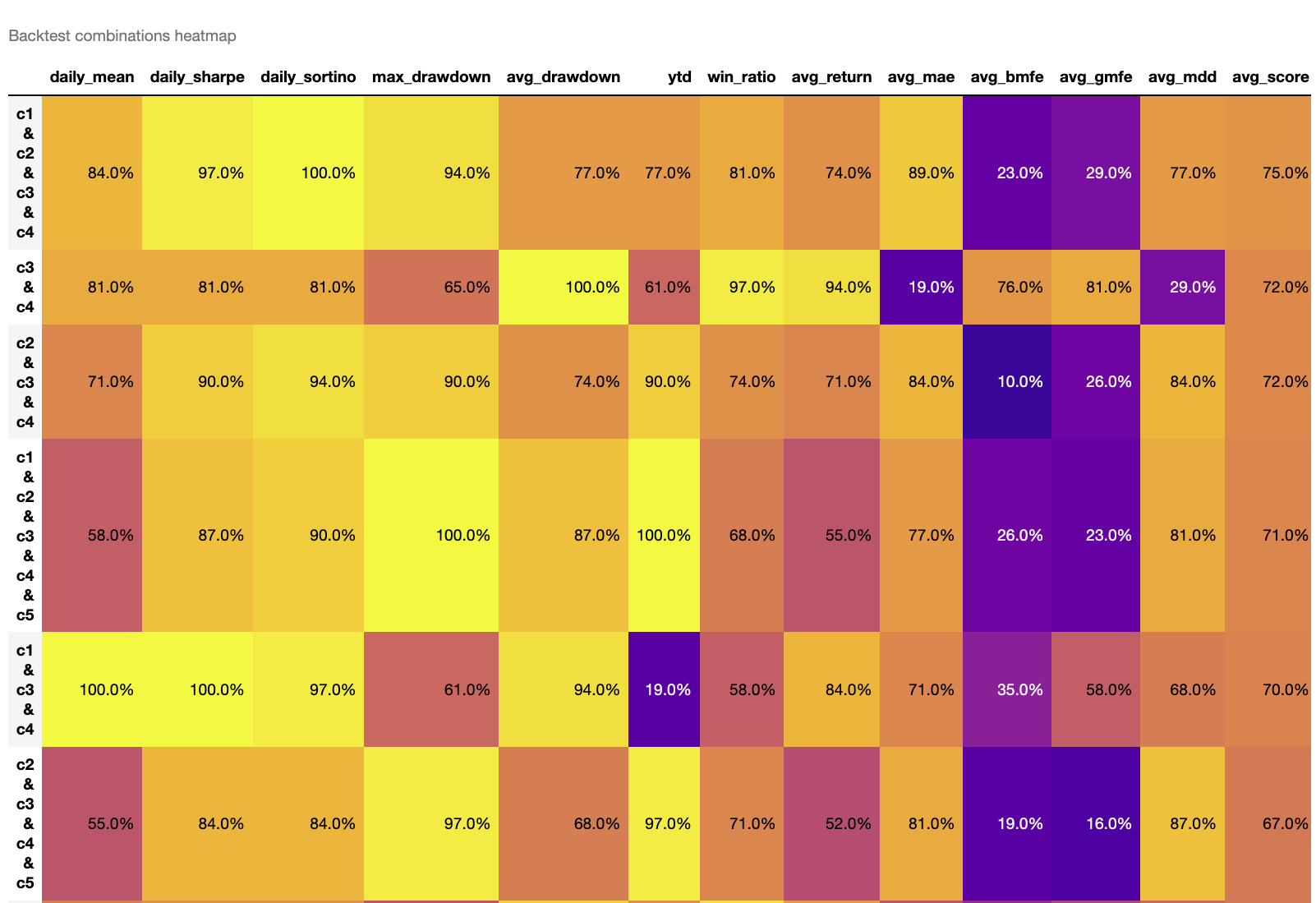
report_collection.plot_stats('heatmap')
繪製指標分級熱力圖,數值越大為排名越前面,avg_score為指標平均分數,分數越高為評價較正向的策略。
Advanced Usage
- Filter specific metrics:
report_collection.plot_stats('bar', indicators=['daily_sharpe', 'win_ratio']) - Custom sorting:
report_collection.plot_stats('heatmap', heatmap_sort_by='daily_sharpe') - Access specific combination:
report = report_collection.reports['c1 & c3']
finlab.optimize.combinations.ReportCollection
回測組合比較報告
判斷策略組合數據優劣,從策略海中快速找到體質最強的策略。
也可以觀察在同條件下的策略疊加更多條件後會有什麼變化?
Args:
reports (dict): 回測物件集合,ex:{'strategy1': finlab.backtest.sim(),'strategy2': finlab.backtest.sim()}
get_stats
取得策略指標比較表
指標欄位說明:
'daily_mean': 策略年化報酬'daily_sharpe': 策略年化夏普率'daily_sortino': 策略年化索提諾比率'max_drawdown': 策略報酬率最大回撤率(負向)'avg_drawdown': 策略平均回撤(負向)'ytd': 今年度策略報酬率'win_ratio': 每筆交易勝率'avg_return': 每筆交易平均獲利率'avg_mae': 每筆交易平均最大不利方向幅度(負向)'avg_bmfe': 最大不利方向發生前的"每筆交易平均最大有利方向幅度",若數值越高,越有機會在停損之前操作停利。'avg_gmfe': 每筆交易平均最大有利方向幅度'avg_mdd': 每筆交易平均的最大回撤率(負向)
| RETURNS | DESCRIPTION |
|---|---|
DataFrame
|
策略指標比較報表 |
plot_stats
策略指標比較報表視覺化
| PARAMETER | DESCRIPTION |
|---|---|
mode
|
繪圖模式。
TYPE:
|
heatmap_sort_by
|
heatmap 降冪排序的決定欄位
TYPE:
|
indicators
|
要顯示的特定指標欄位,預設為將指標全部顯示
TYPE:
|
| RETURNS | DESCRIPTION |
|---|---|
Figure
|
長條圖 |
DataFrame
|
熱力圖 |
Examples:
ex1:
繪製指標分群棒狀圖
ex2:
繪製指標分級熱力圖。
'avg_score': 各指標加總後的平均分數,分數越高為整體評價較正向的策略。
預設以avg_score為排序,數值越大為排名越前面,分數越高為整體評價較優的策略。
Performance Tips
When the number of conditions exceeds 6, there will be over 63 combinations, leading to long computation times. Recommendations:
- First backtest individual conditions, remove those with poor performance
- Test in batches (separate technical and fundamental)
- Use longer resample periods (e.g., 'Q')